

显示禁闭内容
是否对公众显示此内容
82
3
一个基于浏览器原生高能 Canvas 引擎开发的轻量级、零依赖、纯前端图片批量压缩与格式转换工具。所有图像处理均在用户本地内存中安全完成,绝不上传任何服务器,完美保护您的隐私。
功能
- 100% 隐私安全(零上传):图片处理全过程在浏览器本地运行,不经过任何远程服务器。
- 批量高能处理:支持一次性拖入或选择多张图片,支持一键批量压制与打包下载 (
.zip)。 - 多维度精准控制:
- 格式转换:支持在 WebP、JPEG、PNG 之间自由转换。
- 画质调节:提供实时质量滑块,平衡体积与清晰度。
- 尺寸限制:支持按指定最大宽度进行等比重采样缩放。
- 目标大小限制(KB):独创的目标体积自动匹配模式,在尽可能保留高画质的前提下,自动通过二分法将图片压制到指定 KB 阈值以内。
- 双向画质对比:支持单张图片压缩完成后的全屏双栏滑块实时对比,像素级检视画质细节差异。
- 实时处理终端日志:内置透明的控制台日志面板,精准记录每张图片的耗时、压缩前后的尺寸与体积变化。
预览
https://www.ximi.me/usr/demo/jpg/
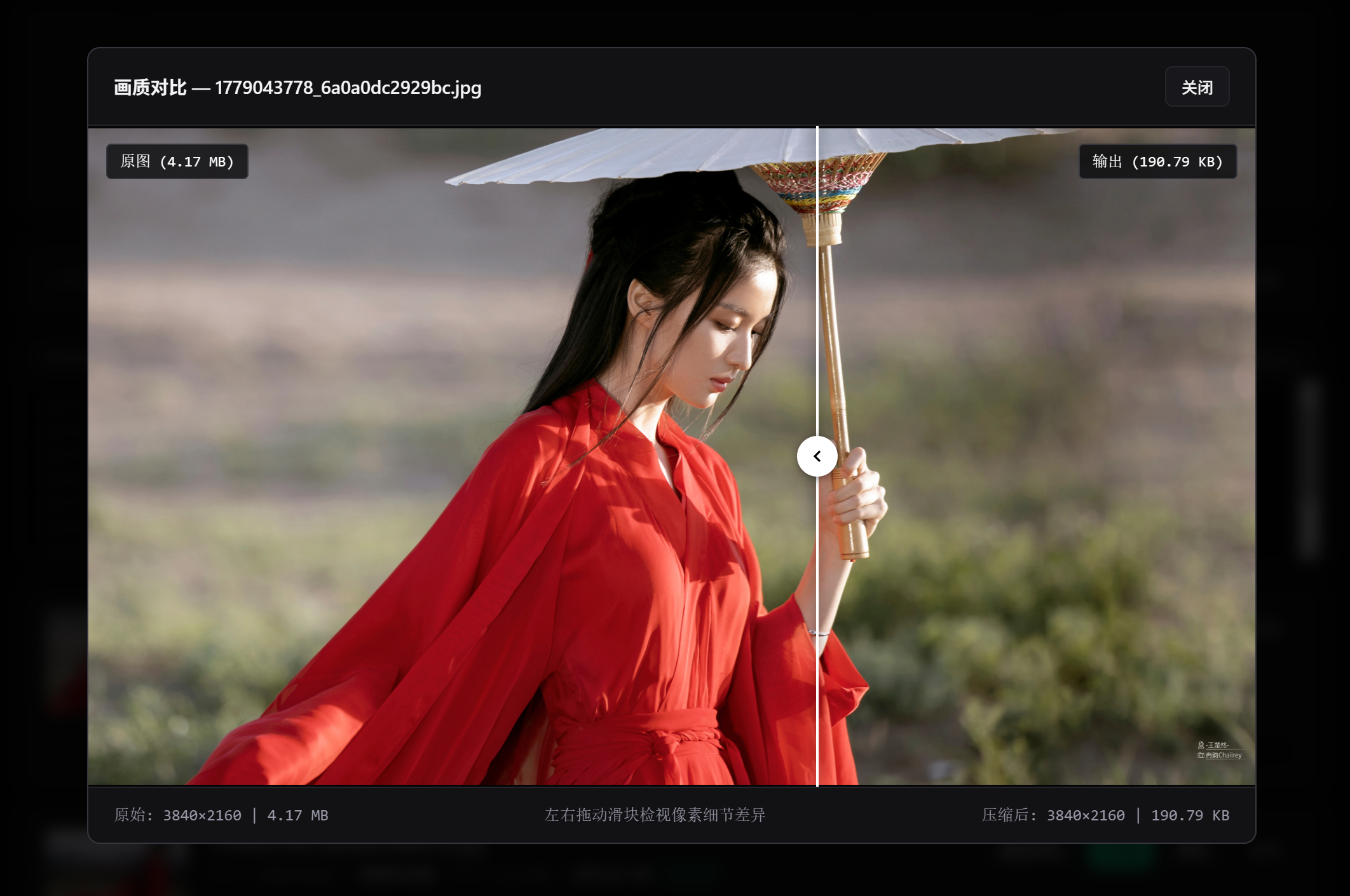 |
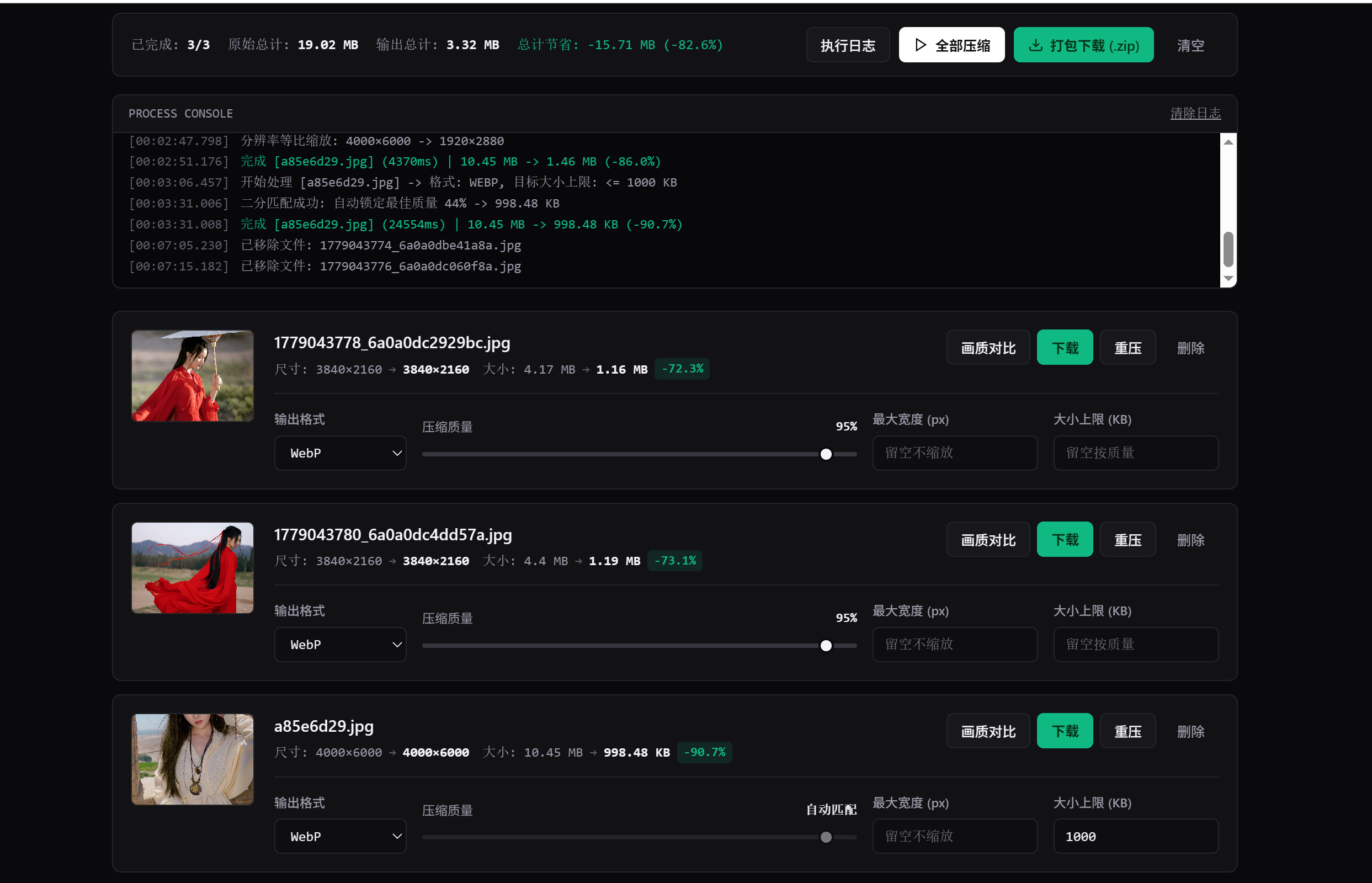 |
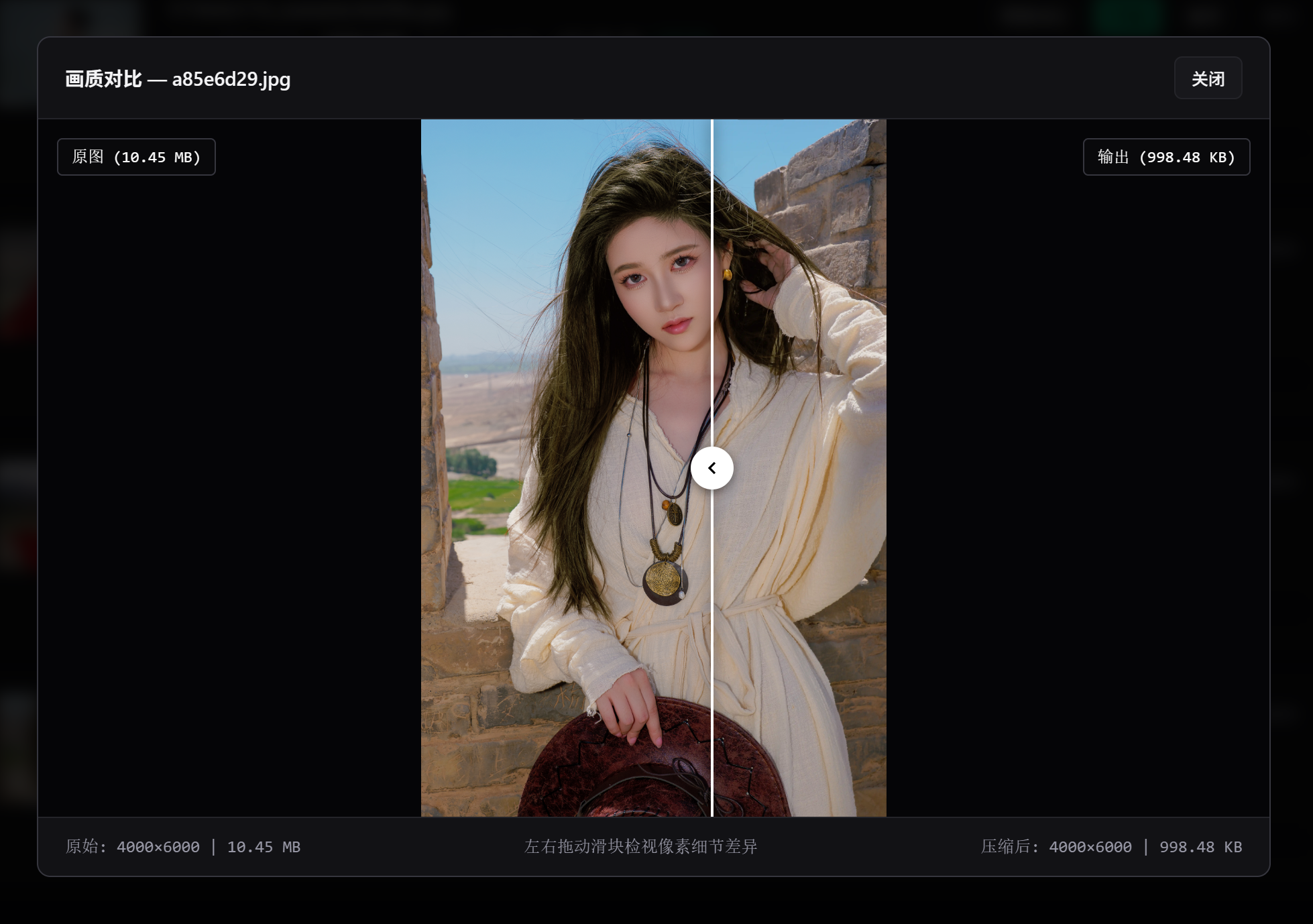 |
技术栈
- 原生 JavaScript (ES6+) / HTML5 Canvas API /
createImageBitmap - 纯客户端归档打包:JSZip
快速使用
无需部署任何后端环境(PHP/Node.js 等),直接下载或复制 index.html 文件,双击即可在任意现代浏览器中完美运行。
代码
<!--
发布地址:https://www.ximi.me/post-6048.html
版本:v1.01
作者:希米
说明:纯前端批量图片格式转换压缩。
更新时间:2026-11-16
-->
<!DOCTYPE html>
<html lang="zh-CN">
<head>
<meta charset="UTF-8">
<meta name="viewport" content="width=device-width, initial-scale=1.0">
<title>Image Compressor — 本地无损/有损批量图像压制工具</title>
<script src="https://cdnjs.cloudflare.com/ajax/libs/jszip/3.10.1/jszip.min.js"></script>
<style>
:root {
--bg-canvas: #0a0a0c;
--bg-panel: #121215;
--bg-elevated: #18181c;
--bg-input: #0e0e11;
--border-subtle: #242429;
--border-strong: #36363e;
--text-primary: #f4f4f6;
--text-secondary: #9898a6;
--text-muted: #5e5e6b;
--accent-brand: #ffffff;
--accent-brand-text: #0a0a0c;
--accent-green: #10b981;
--accent-green-bg: rgba(16, 185, 129, 0.12);
--accent-red: #ef4444;
--accent-red-bg: rgba(239, 68, 68, 0.12);
--font-sans: -apple-system, BlinkMacSystemFont, "Inter", "Segoe UI", Roboto, sans-serif;
--font-mono: ui-monospace, SFMono-Regular, "SF Mono", Menlo, Consolas, monospace;
}
* {
box-sizing: border-box;
margin: 0;
padding: 0;
}
body {
font-family: var(--font-sans);
background-color: var(--bg-canvas);
color: var(--text-primary);
line-height: 1.5;
-webkit-font-smoothing: antialiased;
padding: 40px 20px 80px;
}
.container {
max-width: 1020px;
margin: 0 auto;
}
header {
display: flex;
justify-content: space-between;
align-items: flex-end;
padding-bottom: 24px;
border-bottom: 1px solid var(--border-subtle);
margin-bottom: 24px;
flex-wrap: wrap;
gap: 16px;
}
.brand-area h1 {
font-size: 1.35rem;
font-weight: 600;
letter-spacing: -0.02em;
color: var(--text-primary);
display: flex;
align-items: center;
gap: 10px;
}
.brand-tag {
font-family: var(--font-mono);
font-size: 0.72rem;
font-weight: 500;
color: var(--text-secondary);
background: var(--bg-elevated);
border: 1px solid var(--border-subtle);
padding: 2px 8px;
border-radius: 4px;
}
.brand-area p {
font-size: 0.85rem;
color: var(--text-secondary);
margin-top: 4px;
}
.privacy-note {
font-family: var(--font-mono);
font-size: 0.75rem;
color: var(--text-muted);
display: flex;
align-items: center;
gap: 6px;
}
.status-dot {
width: 6px;
height: 6px;
border-radius: 50%;
background-color: var(--accent-green);
}
/* 全局批量预设配置面板 */
.global-presets-panel {
background: var(--bg-panel);
border: 1px solid var(--border-subtle);
border-radius: 8px;
padding: 16px 20px;
margin-bottom: 20px;
}
.presets-header {
display: flex;
justify-content: space-between;
align-items: center;
margin-bottom: 14px;
padding-bottom: 10px;
border-bottom: 1px solid var(--border-subtle);
flex-wrap: wrap;
gap: 10px;
}
.presets-title {
font-size: 0.82rem;
font-weight: 600;
color: var(--text-primary);
letter-spacing: 0.01em;
}
.presets-grid {
display: grid;
grid-template-columns: repeat(4, 1fr);
gap: 16px;
align-items: end;
}
@media (max-width: 820px) {
.presets-grid {
grid-template-columns: repeat(2, 1fr);
}
}
@media (max-width: 500px) {
.presets-grid {
grid-template-columns: 1fr;
}
}
/* 拖拽投放区 */
.drop-zone {
background: var(--bg-panel);
border: 1px dashed var(--border-strong);
border-radius: 8px;
padding: 36px 24px;
text-align: center;
cursor: pointer;
transition: background-color 0.15s ease, border-color 0.15s ease;
margin-bottom: 24px;
}
.drop-zone:hover, .drop-zone.dragover {
background: var(--bg-elevated);
border-color: var(--text-secondary);
}
.drop-icon {
color: var(--text-secondary);
margin-bottom: 10px;
}
.drop-title {
font-size: 0.92rem;
font-weight: 500;
color: var(--text-primary);
margin-bottom: 4px;
}
.drop-sub {
font-size: 0.78rem;
color: var(--text-muted);
}
/* 队列状态与操作栏 */
.toolbar {
display: none;
justify-content: space-between;
align-items: center;
background: var(--bg-panel);
border: 1px solid var(--border-subtle);
border-radius: 8px;
padding: 12px 16px;
margin-bottom: 16px;
flex-wrap: wrap;
gap: 12px;
}
.toolbar-metrics {
display: flex;
align-items: center;
gap: 16px;
font-family: var(--font-mono);
font-size: 0.78rem;
color: var(--text-secondary);
flex-wrap: wrap;
}
.toolbar-metrics strong {
color: var(--text-primary);
font-weight: 600;
}
.toolbar-metrics .saved-highlight {
color: var(--accent-green);
}
.toolbar-actions {
display: flex;
gap: 8px;
align-items: center;
flex-wrap: wrap;
}
/* 通用按钮系统 */
.btn {
height: 32px;
padding: 0 12px;
border-radius: 6px;
font-size: 0.78rem;
font-weight: 500;
font-family: var(--font-sans);
display: inline-flex;
align-items: center;
justify-content: center;
gap: 6px;
cursor: pointer;
border: 1px solid transparent;
text-decoration: none;
transition: all 0.12s ease;
user-select: none;
white-space: nowrap;
}
.btn svg {
width: 14px;
height: 14px;
stroke-width: 2;
}
.btn-primary {
background: var(--accent-brand);
color: var(--accent-brand-text);
font-weight: 600;
}
.btn-primary:hover {
background: #e2e2e6;
}
.btn-secondary {
background: var(--bg-elevated);
color: var(--text-primary);
border-color: var(--border-subtle);
}
.btn-secondary:hover {
border-color: var(--border-strong);
background: #202026;
}
.btn-success {
background: var(--accent-green);
color: #052e16;
font-weight: 600;
}
.btn-success:hover {
background: #34d399;
}
.btn-danger {
background: transparent;
color: var(--text-secondary);
border-color: transparent;
}
.btn-danger:hover {
color: var(--accent-red);
background: var(--accent-red-bg);
}
.btn:disabled {
opacity: 0.4;
cursor: not-allowed;
}
/* 实时日志终端面板 */
.log-panel {
display: none;
background: #08080a;
border: 1px solid var(--border-subtle);
border-radius: 8px;
margin-bottom: 20px;
overflow: hidden;
}
.log-header {
display: flex;
justify-content: space-between;
align-items: center;
padding: 8px 14px;
background: var(--bg-panel);
border-bottom: 1px solid var(--border-subtle);
font-family: var(--font-mono);
font-size: 0.72rem;
color: var(--text-secondary);
}
.log-body {
padding: 10px 14px;
max-height: 140px;
overflow-y: auto;
font-family: var(--font-mono);
font-size: 0.74rem;
line-height: 1.6;
color: var(--text-secondary);
}
.log-entry {
display: flex;
gap: 10px;
}
.log-time {
color: var(--text-muted);
flex-shrink: 0;
}
.log-msg.info { color: var(--text-secondary); }
.log-msg.success { color: var(--accent-green); }
.log-msg.warn { color: #f59e0b; }
.log-msg.error { color: var(--accent-red); }
/* 图片列表卡片 */
.file-list {
display: flex;
flex-direction: column;
gap: 12px;
}
.file-card {
background: var(--bg-panel);
border: 1px solid var(--border-subtle);
border-radius: 8px;
padding: 16px;
display: grid;
grid-template-columns: 112px 1fr;
gap: 18px;
align-items: start;
transition: border-color 0.15s ease;
}
.file-card:hover {
border-color: var(--border-strong);
}
@media (max-width: 768px) {
.file-card {
grid-template-columns: 1fr;
}
}
.thumb-wrapper {
width: 112px;
height: 84px;
border-radius: 6px;
overflow: hidden;
background: #000;
border: 1px solid var(--border-subtle);
position: relative;
cursor: pointer;
}
.thumb-wrapper img {
width: 100%;
height: 100%;
object-fit: cover;
display: block;
transition: opacity 0.15s ease;
}
.thumb-wrapper:hover img {
opacity: 0.75;
}
.thumb-hover-tip {
position: absolute;
inset: 0;
display: flex;
align-items: center;
justify-content: center;
background: rgba(0, 0, 0, 0.55);
color: #fff;
font-size: 0.72rem;
font-weight: 500;
opacity: 0;
transition: opacity 0.15s ease;
}
.thumb-wrapper.has-result:hover .thumb-hover-tip {
opacity: 1;
}
.card-main {
display: flex;
flex-direction: column;
gap: 14px;
min-width: 0;
}
.card-top-row {
display: flex;
justify-content: space-between;
align-items: flex-start;
gap: 12px;
padding-bottom: 12px;
border-bottom: 1px solid var(--border-subtle);
flex-wrap: wrap;
}
.file-title-group {
min-width: 0;
flex: 1;
}
.file-name {
font-size: 0.92rem;
font-weight: 600;
color: var(--text-primary);
white-space: nowrap;
overflow: hidden;
text-overflow: ellipsis;
margin-bottom: 4px;
}
.comparison-metrics {
display: flex;
align-items: center;
flex-wrap: wrap;
gap: 12px;
font-family: var(--font-mono);
font-size: 0.76rem;
color: var(--text-secondary);
}
.metric-pair {
display: inline-flex;
align-items: center;
gap: 6px;
}
.metric-arrow {
color: var(--text-muted);
}
.metric-new {
color: var(--text-primary);
font-weight: 600;
}
.diff-badge {
padding: 1px 6px;
border-radius: 4px;
font-weight: 600;
font-size: 0.72rem;
}
.diff-badge.positive {
background: var(--accent-green-bg);
color: var(--accent-green);
}
.diff-badge.negative {
background: var(--accent-red-bg);
color: var(--accent-red);
}
.card-actions {
display: flex;
align-items: center;
gap: 6px;
flex-shrink: 0;
}
/* 单张卡片 4 列参数控制网格 */
.card-controls-grid {
display: grid;
grid-template-columns: 120px 1fr 150px 150px;
gap: 14px;
align-items: center;
}
@media (max-width: 820px) {
.card-controls-grid {
grid-template-columns: repeat(2, 1fr);
gap: 12px;
}
}
@media (max-width: 480px) {
.card-controls-grid {
grid-template-columns: 1fr;
}
}
.control-field label {
display: block;
font-size: 0.72rem;
font-weight: 500;
color: var(--text-secondary);
margin-bottom: 6px;
}
.field-select, .field-input {
width: 100%;
height: 32px;
background: var(--bg-input);
border: 1px solid var(--border-subtle);
border-radius: 6px;
padding: 0 10px;
color: var(--text-primary);
font-family: var(--font-mono);
font-size: 0.78rem;
outline: none;
transition: border-color 0.15s ease;
}
.field-select:focus, .field-input:focus {
border-color: var(--text-secondary);
}
.field-input:disabled, input[type="range"]:disabled {
opacity: 0.45;
cursor: not-allowed;
}
.quality-field {
display: flex;
flex-direction: column;
gap: 6px;
}
.quality-header {
display: flex;
justify-content: space-between;
font-size: 0.72rem;
color: var(--text-secondary);
}
.quality-val {
font-family: var(--font-mono);
color: var(--text-primary);
font-weight: 600;
}
input[type="range"] {
-webkit-appearance: none;
width: 100%;
height: 4px;
background: var(--border-strong);
border-radius: 2px;
outline: none;
margin-top: 8px;
margin-bottom: 6px;
}
input[type="range"]::-webkit-slider-thumb {
-webkit-appearance: none;
width: 14px;
height: 14px;
border-radius: 50%;
background: var(--text-primary);
cursor: pointer;
border: 2px solid var(--bg-canvas);
}
.empty-state {
text-align: center;
padding: 48px 20px;
border: 1px solid var(--border-subtle);
border-radius: 8px;
background: var(--bg-panel);
color: var(--text-muted);
font-size: 0.85rem;
}
/* 全屏对比弹窗 */
.modal-backdrop {
display: none;
position: fixed;
inset: 0;
background: rgba(0, 0, 0, 0.85);
backdrop-filter: blur(6px);
z-index: 1000;
align-items: center;
justify-content: center;
padding: 24px;
}
.modal-backdrop.active {
display: flex;
}
.compare-modal {
background: var(--bg-panel);
border: 1px solid var(--border-strong);
border-radius: 10px;
width: 100%;
max-width: 920px;
overflow: hidden;
display: flex;
flex-direction: column;
}
.modal-header {
padding: 14px 20px;
border-bottom: 1px solid var(--border-subtle);
display: flex;
justify-content: space-between;
align-items: center;
}
.modal-title {
font-size: 0.9rem;
font-weight: 600;
}
.compare-stage {
position: relative;
width: 100%;
height: 520px;
background: #050507;
overflow: hidden;
user-select: none;
cursor: ew-resize;
}
.compare-img-layer {
position: absolute;
inset: 0;
width: 100%;
height: 100%;
object-fit: contain;
pointer-events: none;
}
.compare-divider {
position: absolute;
top: 0;
bottom: 0;
width: 2px;
background: #ffffff;
box-shadow: 0 0 10px rgba(0,0,0,0.8);
pointer-events: none;
}
.compare-handle {
position: absolute;
top: 50%;
left: 50%;
transform: translate(-50%, -50%);
width: 32px;
height: 32px;
border-radius: 50%;
background: #ffffff;
color: #000;
display: flex;
align-items: center;
justify-content: center;
box-shadow: 0 2px 8px rgba(0,0,0,0.5);
}
.compare-label {
position: absolute;
top: 14px;
padding: 4px 10px;
background: rgba(10, 10, 12, 0.8);
border: 1px solid var(--border-strong);
border-radius: 4px;
font-family: var(--font-mono);
font-size: 0.75rem;
color: #fff;
pointer-events: none;
}
.compare-label.left { left: 14px; }
.compare-label.right { right: 14px; }
.modal-footer {
padding: 12px 20px;
border-top: 1px solid var(--border-subtle);
display: flex;
justify-content: space-between;
align-items: center;
font-family: var(--font-mono);
font-size: 0.78rem;
color: var(--text-secondary);
}
</style>
</head>
<body>
<div class="container">
<header>
<div class="brand-area">
<h1>
Image Compressor
<span class="brand-tag">CLIENT-SIDE</span>
</h1>
<p>纯浏览器本地图像压缩、分辨率重采样与体积上限精确控制工具</p>
</div>
<div class="privacy-note">
<span class="status-dot"></span>
本地内存处理 · 零文件上传
</div>
</header>
<!-- 全局批量参数预设区 -->
<div class="global-presets-panel">
<div class="presets-header">
<span class="presets-title">全局批量参数设置(新导入图片默认继承此配置,也可一键覆盖当前队列)</span>
<button class="btn btn-secondary" id="applyToAllBtn">应用参数至当前全部队列</button>
</div>
<div class="presets-grid">
<div class="control-field">
<label>批量输出格式</label>
<select class="field-select" id="globalFormat">
<option value="image/webp">WebP (推荐)</option>
<option value="image/jpeg">JPEG</option>
<option value="image/png">PNG</option>
</select>
</div>
<div class="quality-field">
<div class="quality-header">
<span>默认压缩质量</span>
<span class="quality-val" id="globalQualityLabel">80%</span>
</div>
<input type="range" id="globalQuality" min="10" max="100" value="80">
</div>
<div class="control-field">
<label>批量最大宽度 (px)</label>
<input type="number" class="field-input" id="globalMaxWidth" placeholder="例如 1920 (留空不缩放)" min="1">
</div>
<div class="control-field">
<label>目标文件大小上限 (KB)</label>
<input type="number" class="field-input" id="globalTargetKB" placeholder="例如 200 (留空按质量)" min="5">
</div>
</div>
</div>
<!-- 拖拽选择区 -->
<div class="drop-zone" id="dropZone">
<div class="drop-icon">
<svg width="28" height="28" viewBox="0 0 24 24" fill="none" stroke="currentColor" stroke-width="1.75" stroke-linecap="round" stroke-linejoin="round">
<path d="M21 15v4a2 2 0 0 1-2 2H5a2 2 0 0 1-2-2v-4"></path>
<polyline points="17 8 12 3 7 8"></polyline>
<line x1="12" y1="3" x2="12" y2="15"></line>
</svg>
</div>
<div class="drop-title">点击选择图片,或将文件拖拽至此处(支持多选)</div>
<div class="drop-sub">支持批量导入 JPEG、PNG、WebP 格式</div>
<input type="file" id="fileInput" multiple accept="image/jpeg,image/png,image/webp" style="display: none;">
</div>
<!-- 顶部队列工具栏 -->
<div class="toolbar" id="toolbar">
<div class="toolbar-metrics" id="toolbarMetrics">
<span>队列: <strong>0</strong></span>
</div>
<div class="toolbar-actions">
<button class="btn btn-secondary" id="toggleLogBtn">执行日志</button>
<button class="btn btn-primary" id="compressAllBtn">
<svg viewBox="0 0 24 24" fill="none" stroke="currentColor"><polygon points="5 3 19 12 5 21 5 3"></polygon></svg>
全部压缩
</button>
<button class="btn btn-success" id="downloadZipBtn" style="display: none;">
<svg viewBox="0 0 24 24" fill="none" stroke="currentColor"><path d="M21 15v4a2 2 0 0 1-2 2H5a2 2 0 0 1-2-2v-4"></path><polyline points="7 10 12 15 17 10"></polyline><line x1="12" y1="15" x2="12" y2="3"></line></svg>
打包下载 (.zip)
</button>
<button class="btn btn-danger" id="clearAllBtn">清空</button>
</div>
</div>
<!-- 实时压缩日志面板 -->
<div class="log-panel" id="logPanel">
<div class="log-header">
<span>PROCESS CONSOLE</span>
<span id="logClearBtn" style="cursor: pointer; text-decoration: underline;">清除日志</span>
</div>
<div class="log-body" id="logBody"></div>
</div>
<!-- 文件列表容器 -->
<div class="file-list" id="fileList">
<div class="empty-state">暂无待处理图像,请在上方区域添加文件</div>
</div>
</div>
<!-- 压缩前后画质对比弹窗 -->
<div class="modal-backdrop" id="compareModal">
<div class="compare-modal">
<div class="modal-header">
<div class="modal-title" id="compareTitle">画质对比预览</div>
<button class="btn btn-secondary" id="closeModalBtn">关闭</button>
</div>
<div class="compare-stage" id="compareStage">
<img id="compareImgAfter" class="compare-img-layer" alt="压缩后">
<img id="compareImgBefore" class="compare-img-layer" alt="原图" style="clip-path: inset(0 50% 0 0);">
<div class="compare-divider" id="compareDivider" style="left: 50%;">
<div class="compare-handle">
<svg width="16" height="16" viewBox="0 0 24 24" fill="none" stroke="currentColor" stroke-width="2.5">
<polyline points="15 18 9 12 15 6"></polyline>
</svg>
</div>
</div>
<div class="compare-label left" id="labelBefore">原图</div>
<div class="compare-label right" id="labelAfter">压缩后</div>
</div>
<div class="modal-footer">
<span id="compareSpecsLeft">原始规格: -</span>
<span>左右拖动滑块检视像素细节差异</span>
<span id="compareSpecsRight">输出规格: -</span>
</div>
</div>
</div>
<script>
// 全局预设元素
const globalFormat = document.getElementById('globalFormat');
const globalQuality = document.getElementById('globalQuality');
const globalQualityLabel = document.getElementById('globalQualityLabel');
const globalMaxWidth = document.getElementById('globalMaxWidth');
const globalTargetKB = document.getElementById('globalTargetKB');
const applyToAllBtn = document.getElementById('applyToAllBtn');
// 基础交互元素
const dropZone = document.getElementById('dropZone');
const fileInput = document.getElementById('fileInput');
const toolbar = document.getElementById('toolbar');
const toolbarMetrics = document.getElementById('toolbarMetrics');
const compressAllBtn = document.getElementById('compressAllBtn');
const downloadZipBtn = document.getElementById('downloadZipBtn');
const clearAllBtn = document.getElementById('clearAllBtn');
const fileListEl = document.getElementById('fileList');
// 日志面板元素
const logPanel = document.getElementById('logPanel');
const logBody = document.getElementById('logBody');
const toggleLogBtn = document.getElementById('toggleLogBtn');
const logClearBtn = document.getElementById('logClearBtn');
// 对比弹窗元素
const compareModal = document.getElementById('compareModal');
const compareStage = document.getElementById('compareStage');
const compareImgBefore = document.getElementById('compareImgBefore');
const compareImgAfter = document.getElementById('compareImgAfter');
const compareDivider = document.getElementById('compareDivider');
const closeModalBtn = document.getElementById('closeModalBtn');
let items = [];
// 全局滑块同步与目标大小联动提示
globalQuality.addEventListener('input', () => {
globalQualityLabel.textContent = globalQuality.value + '%';
});
globalTargetKB.addEventListener('input', () => {
const hasTarget = parseFloat(globalTargetKB.value) > 0;
globalQuality.disabled = hasTarget;
globalQualityLabel.textContent = hasTarget ? '自动匹配' : (globalQuality.value + '%');
});
// 一键应用全局参数至当前全部队列
applyToAllBtn.addEventListener('click', () => {
if (items.length === 0) {
appendLog('当前队列为空,参数已保存为新文件默认预设', 'info');
return;
}
const fmt = globalFormat.value;
const q = parseInt(globalQuality.value);
const maxW = globalMaxWidth.value;
const targetKB = globalTargetKB.value;
items.forEach(item => {
item.format = fmt;
item.quality = q;
item.maxWidth = maxW;
item.targetKB = targetKB;
});
appendLog(`已将全局参数同步应用至队列中的 ${items.length} 张图像`, 'success');
render();
});
function formatBytes(bytes) {
if (bytes === 0) return '0 B';
const k = 1024;
const sizes = ['B', 'KB', 'MB', 'GB'];
const i = Math.floor(Math.log(bytes) / Math.log(k));
return parseFloat((bytes / Math.pow(k, i)).toFixed(2)) + ' ' + sizes[i];
}
function appendLog(message, type = 'info') {
logPanel.style.display = 'block';
const now = new Date();
const timeStr = `${String(now.getHours()).padStart(2, '0')}:${String(now.getMinutes()).padStart(2, '0')}:${String(now.getSeconds()).padStart(2, '0')}.${String(now.getMilliseconds()).padStart(3, '0')}`;
const entry = document.createElement('div');
entry.className = 'log-entry';
entry.innerHTML = `<span class="log-time">[${timeStr}]</span><span class="log-msg ${type}">${message}</span>`;
logBody.appendChild(entry);
logBody.scrollTop = logBody.scrollHeight;
}
toggleLogBtn.addEventListener('click', () => {
logPanel.style.display = logPanel.style.display === 'none' ? 'block' : 'none';
});
logClearBtn.addEventListener('click', () => {
logBody.innerHTML = '';
});
dropZone.addEventListener('click', () => fileInput.click());
dropZone.addEventListener('dragover', (e) => { e.preventDefault(); dropZone.classList.add('dragover'); });
dropZone.addEventListener('dragleave', () => dropZone.classList.remove('dragover'));
dropZone.addEventListener('drop', (e) => {
e.preventDefault();
dropZone.classList.remove('dragover');
handleFiles(e.dataTransfer.files);
});
fileInput.addEventListener('change', (e) => {
handleFiles(e.target.files);
fileInput.value = '';
});
async function handleFiles(fileList) {
const validTypes = ['image/jpeg', 'image/png', 'image/webp'];
const filesArray = Array.from(fileList);
let addedCount = 0;
for (const file of filesArray) {
if (!validTypes.includes(file.type)) {
appendLog(`跳过不支持的文件格式: ${file.name} (${file.type || '未知'})`, 'warn');
continue;
}
const thumbUrl = URL.createObjectURL(file);
let origW = 0, origH = 0;
try {
const bmp = await createImageBitmap(file);
origW = bmp.width;
origH = bmp.height;
bmp.close();
} catch (e) {}
items.push({
id: 'id_' + Math.random().toString(36).substr(2, 9),
file: file,
thumbUrl: thumbUrl,
origSize: file.size,
origW: origW,
origH: origH,
// 默认继承全局批量设置
format: globalFormat.value,
quality: parseInt(globalQuality.value),
maxWidth: globalMaxWidth.value,
targetKB: globalTargetKB.value,
status: 'idle',
newBlob: null,
newUrl: null,
newName: '',
newSize: 0,
newW: 0,
newH: 0
});
addedCount++;
}
if (addedCount > 0) {
appendLog(`成功导入 ${addedCount} 张图像至本地处理队列`, 'success');
render();
}
}
function updateToolbarMetrics() {
const doneItems = items.filter(i => i.status === 'done');
if (doneItems.length === 0) {
toolbarMetrics.innerHTML = `<span>队列文件: <strong>${items.length}</strong> 张</span>`;
downloadZipBtn.style.display = 'none';
return;
}
const totalOrig = doneItems.reduce((acc, cur) => acc + cur.origSize, 0);
const totalNew = doneItems.reduce((acc, cur) => acc + cur.newSize, 0);
const savedBytes = totalOrig - totalNew;
const savedPct = totalOrig > 0 ? ((savedBytes / totalOrig) * 100).toFixed(1) : 0;
toolbarMetrics.innerHTML = `
<span>已完成: <strong>${doneItems.length}/${items.length}</strong></span>
<span>原始总计: <strong>${formatBytes(totalOrig)}</strong></span>
<span>输出总计: <strong>${formatBytes(totalNew)}</strong></span>
${savedBytes > 0 ? `<span class="saved-highlight">总计节省: -${formatBytes(savedBytes)} (-${savedPct}%)</span>` : ''}
`;
downloadZipBtn.style.display = 'inline-flex';
}
function render() {
if (items.length === 0) {
toolbar.style.display = 'none';
fileListEl.innerHTML = `<div class="empty-state">暂无待处理图像,请在上方区域添加文件</div>`;
return;
}
toolbar.style.display = 'flex';
updateToolbarMetrics();
fileListEl.innerHTML = items.map(item => {
const origDimStr = item.origW ? `${item.origW}×${item.origH}` : '未知尺寸';
const origSizeStr = formatBytes(item.origSize);
const hasTargetKB = parseFloat(item.targetKB) > 0;
let comparisonHtml = `
<div class="metric-pair">
<span>原始尺寸: <span class="metric-new">${origDimStr}</span></span>
</div>
<div class="metric-pair">
<span>原始大小: <span class="metric-new">${origSizeStr}</span></span>
</div>
<div class="metric-pair">
<span>状态: 待处理</span>
</div>
`;
if (item.status === 'processing') {
comparisonHtml = `
<div class="metric-pair">
<span style="color:#38bdf8;">正在进行本地重采样与编码...</span>
</div>
`;
} else if (item.status === 'done') {
const newDimStr = `${item.newW}×${item.newH}`;
const newSizeStr = formatBytes(item.newSize);
const diffPct = ((1 - item.newSize / item.origSize) * 100).toFixed(1);
const isPositive = parseFloat(diffPct) > 0;
const badgeClass = isPositive ? 'positive' : 'negative';
const badgeText = isPositive ? `-${diffPct}%` : `+${Math.abs(diffPct)}%`;
comparisonHtml = `
<div class="metric-pair">
<span>尺寸: ${origDimStr}</span>
<span class="metric-arrow">→</span>
<span class="metric-new">${newDimStr}</span>
</div>
<div class="metric-pair">
<span>大小: ${origSizeStr}</span>
<span class="metric-arrow">→</span>
<span class="metric-new">${newSizeStr}</span>
<span class="diff-badge ${badgeClass}">${badgeText}</span>
</div>
`;
}
let actionButtonsHtml = `
<button class="btn btn-primary" onclick="compressSingle('${item.id}')" ${item.status === 'processing' ? 'disabled' : ''}>
压缩
</button>
<button class="btn btn-danger" onclick="removeSingle('${item.id}')" ${item.status === 'processing' ? 'disabled' : ''}>
删除
</button>
`;
if (item.status === 'done') {
actionButtonsHtml = `
<button class="btn btn-secondary" onclick="openCompare('${item.id}')">画质对比</button>
<a href="${item.newUrl}" download="${item.newName}" class="btn btn-success">下载</a>
<button class="btn btn-secondary" onclick="compressSingle('${item.id}')">重压</button>
<button class="btn btn-danger" onclick="removeSingle('${item.id}')">删除</button>
`;
}
return `
<div class="file-card" id="card_${item.id}">
<div class="thumb-wrapper ${item.status === 'done' ? 'has-result' : ''}" onclick="${item.status === 'done' ? `openCompare('${item.id}')` : ''}">
<img src="${item.status === 'done' ? item.newUrl : item.thumbUrl}" alt="${item.file.name}">
<div class="thumb-hover-tip">点击对比画质</div>
</div>
<div class="card-main">
<div class="card-top-row">
<div class="file-title-group">
<div class="file-name" title="${item.file.name}">${item.file.name}</div>
<div class="comparison-metrics">
${comparisonHtml}
</div>
</div>
<div class="card-actions">
${actionButtonsHtml}
</div>
</div>
<div class="card-controls-grid">
<div class="control-field">
<label>输出格式</label>
<select class="field-select" onchange="updateField('${item.id}', 'format', this.value)">
<option value="image/webp" ${item.format === 'image/webp' ? 'selected' : ''}>WebP</option>
<option value="image/jpeg" ${item.format === 'image/jpeg' ? 'selected' : ''}>JPEG</option>
<option value="image/png" ${item.format === 'image/png' ? 'selected' : ''}>PNG</option>
</select>
</div>
<div class="quality-field">
<div class="quality-header">
<span>压缩质量</span>
<span class="quality-val" id="q_label_${item.id}">${hasTargetKB ? '自动匹配' : item.quality + '%'}</span>
</div>
<input type="range" id="q_slider_${item.id}" min="10" max="100" value="${item.quality}" ${hasTargetKB ? 'disabled' : ''}
oninput="document.getElementById('q_label_${item.id}').textContent = this.value + '%'; updateField('${item.id}', 'quality', parseInt(this.value))">
</div>
<div class="control-field">
<label>最大宽度 (px)</label>
<input type="number" class="field-input" placeholder="留空不缩放" value="${item.maxWidth}" min="1"
onchange="updateField('${item.id}', 'maxWidth', this.value)">
</div>
<div class="control-field">
<label>大小上限 (KB)</label>
<input type="number" class="field-input" placeholder="留空按质量" value="${item.targetKB}" min="5"
oninput="handleItemTargetKB('${item.id}', this.value)">
</div>
</div>
</div>
</div>
`;
}).join('');
}
window.updateField = function(id, key, val) {
const item = items.find(i => i.id === id);
if (item) {
item[key] = val;
}
};
// 单张卡片输入目标大小上限时,动态切换滑块禁用状态
window.handleItemTargetKB = function(id, val) {
const item = items.find(i => i.id === id);
if (!item) return;
item.targetKB = val;
const hasTarget = parseFloat(val) > 0;
const slider = document.getElementById(`q_slider_${id}`);
const label = document.getElementById(`q_label_${id}`);
if (slider && label) {
slider.disabled = hasTarget;
label.textContent = hasTarget ? '自动匹配' : (item.quality + '%');
}
};
window.removeSingle = function(id) {
const idx = items.findIndex(i => i.id === id);
if (idx !== -1) {
const removed = items[idx];
URL.revokeObjectURL(removed.thumbUrl);
if (removed.newUrl) URL.revokeObjectURL(removed.newUrl);
items.splice(idx, 1);
appendLog(`已移除文件: ${removed.file.name}`, 'info');
render();
}
};
clearAllBtn.addEventListener('click', () => {
items.forEach(item => {
URL.revokeObjectURL(item.thumbUrl);
if (item.newUrl) URL.revokeObjectURL(item.newUrl);
});
items = [];
appendLog('已清空当前处理队列', 'info');
render();
});
// Canvas 编码辅助函数
function canvasToBlobAsync(canvas, mimeType, quality) {
return new Promise((resolve, reject) => {
canvas.toBlob((blob) => {
if (blob) resolve(blob);
else reject(new Error('编码输出为空'));
}, mimeType, quality);
});
}
// 核心压缩执行函数(支持固定质量模式 & 二分法目标大小上限模式)
async function processCompression(item) {
const startTime = performance.now();
item.status = 'processing';
render();
const targetFormatName = item.format.split('/')[1].toUpperCase();
const targetKBVal = parseFloat(item.targetKB);
const isTargetSizeMode = !isNaN(targetKBVal) && targetKBVal > 0;
if (isTargetSizeMode) {
appendLog(`开始处理 [${item.file.name}] -> 格式: ${targetFormatName}, 目标大小上限: <= ${targetKBVal} KB`, 'info');
} else {
appendLog(`开始处理 [${item.file.name}] -> 格式: ${targetFormatName}, 固定质量: ${item.quality}%`, 'info');
}
await new Promise(r => setTimeout(r, 20));
try {
const bitmap = await createImageBitmap(item.file);
let targetW = bitmap.width;
let targetH = bitmap.height;
const maxW = parseInt(item.maxWidth);
if (!isNaN(maxW) && maxW > 0 && targetW > maxW) {
targetH = Math.round(targetH * (maxW / targetW));
targetW = maxW;
appendLog(`分辨率等比缩放: ${bitmap.width}×${bitmap.height} -> ${targetW}×${targetH}`, 'info');
}
const canvas = document.createElement('canvas');
canvas.width = targetW;
canvas.height = targetH;
const ctx = canvas.getContext('2d');
ctx.imageSmoothingEnabled = true;
ctx.imageSmoothingQuality = 'high';
if (item.format === 'image/jpeg') {
ctx.fillStyle = '#FFFFFF';
ctx.fillRect(0, 0, targetW, targetH);
}
ctx.drawImage(bitmap, 0, 0, targetW, targetH);
bitmap.close();
let finalBlob = null;
if (isTargetSizeMode) {
const targetBytes = targetKBVal * 1024;
if (item.format === 'image/png') {
appendLog(`提示: PNG 为无损编码,不支持质量系数调节,将输出标准无损压缩结果`, 'warn');
finalBlob = await canvasToBlobAsync(canvas, item.format, 1.0);
} else {
// 先测试最高质量 (0.95) 是否已经满足大小要求
let bestBlob = await canvasToBlobAsync(canvas, item.format, 0.95);
if (bestBlob.size <= targetBytes) {
finalBlob = bestBlob;
appendLog(`95% 质量下体积 (${formatBytes(bestBlob.size)}) 已满足 <= ${targetKBVal} KB 要求`, 'info');
} else {
// 执行 7 轮二分查找,寻找满足 <= targetBytes 的最高画质
let minQ = 0.05;
let maxQ = 0.95;
let validBlob = null;
let finalUsedQ = minQ;
for (let step = 0; step < 7; step++) {
const midQ = (minQ + maxQ) / 2;
const testBlob = await canvasToBlobAsync(canvas, item.format, midQ);
if (testBlob.size <= targetBytes) {
validBlob = testBlob;
finalUsedQ = midQ;
minQ = midQ; // 尝试更高的画质
} else {
maxQ = midQ; // 体积超标,降低画质
}
}
if (validBlob) {
finalBlob = validBlob;
appendLog(`二分匹配成功: 自动锁定最佳质量 ${(finalUsedQ * 100).toFixed(0)}% -> ${formatBytes(finalBlob.size)}`, 'info');
} else {
// 即使 5% 最低质量仍超出限制,输出最低质量版本并提示用户限制宽度
finalBlob = await canvasToBlobAsync(canvas, item.format, 0.05);
appendLog(`警告: 最低质量下体积仍为 ${formatBytes(finalBlob.size)} (超出 ${targetKBVal} KB),建议同时限制最大宽度`, 'warn');
}
}
}
} else {
finalBlob = await canvasToBlobAsync(canvas, item.format, item.quality / 100);
}
if (item.newUrl) URL.revokeObjectURL(item.newUrl);
let ext = 'jpg';
if (item.format === 'image/webp') ext = 'webp';
else if (item.format === 'image/png') ext = 'png';
const baseName = item.file.name.substring(0, item.file.name.lastIndexOf('.')) || item.file.name;
item.newBlob = finalBlob;
item.newUrl = URL.createObjectURL(finalBlob);
item.newName = `${baseName}.${ext}`;
item.newSize = finalBlob.size;
item.newW = targetW;
item.newH = targetH;
item.status = 'done';
const costMs = (performance.now() - startTime).toFixed(0);
const savedPct = ((1 - item.newSize / item.origSize) * 100).toFixed(1);
appendLog(`完成 [${item.file.name}] (${costMs}ms) | ${formatBytes(item.origSize)} -> ${formatBytes(item.newSize)} (${savedPct > 0 ? '-' + savedPct : '+' + Math.abs(savedPct)}%)`, 'success');
} catch (err) {
item.status = 'error';
appendLog(`处理失败 [${item.file.name}]: ${err.message}`, 'error');
}
render();
}
window.compressSingle = async function(id) {
const item = items.find(i => i.id === id);
if (item) {
await processCompression(item);
}
};
compressAllBtn.addEventListener('click', async () => {
if (items.length === 0) return;
compressAllBtn.disabled = true;
clearAllBtn.disabled = true;
appendLog(`开始批量队列任务,共 ${items.length} 张图像...`, 'info');
const batchStart = performance.now();
for (const item of items) {
await processCompression(item);
}
const totalTime = ((performance.now() - batchStart) / 1000).toFixed(2);
appendLog(`批量压缩任务全部结束,总耗时 ${totalTime}s`, 'success');
compressAllBtn.disabled = false;
clearAllBtn.disabled = false;
});
downloadZipBtn.addEventListener('click', async () => {
const doneItems = items.filter(i => i.status === 'done' && i.newBlob);
if (doneItems.length === 0) return;
downloadZipBtn.disabled = true;
appendLog(`正在本地打包 ${doneItems.length} 个文件为 ZIP 归档...`, 'info');
try {
const zip = new JSZip();
const nameCounter = {};
doneItems.forEach(item => {
let fileName = item.newName;
if (nameCounter[fileName]) {
const dotIdx = fileName.lastIndexOf('.');
const base = fileName.substring(0, dotIdx);
const ext = fileName.substring(dotIdx);
fileName = `${base}_${nameCounter[fileName]}${ext}`;
nameCounter[item.newName]++;
} else {
nameCounter[fileName] = 1;
}
zip.file(fileName, item.newBlob);
});
const content = await zip.generateAsync({ type: 'blob' });
const url = URL.createObjectURL(content);
const a = document.createElement('a');
a.href = url;
a.download = `compressed_batch_${Date.now()}.zip`;
document.body.appendChild(a);
a.click();
document.body.removeChild(a);
URL.revokeObjectURL(url);
appendLog(`ZIP 打包下载成功 (${formatBytes(content.size)})`, 'success');
} catch (err) {
appendLog(`ZIP 打包异常: ${err.message}`, 'error');
} finally {
downloadZipBtn.disabled = false;
}
});
window.openCompare = function(id) {
const item = items.find(i => i.id === id);
if (!item || item.status !== 'done') return;
document.getElementById('compareTitle').textContent = `画质对比 — ${item.file.name}`;
compareImgBefore.src = item.thumbUrl;
compareImgAfter.src = item.newUrl;
document.getElementById('labelBefore').textContent = `原图 (${formatBytes(item.origSize)})`;
document.getElementById('labelAfter').textContent = `输出 (${formatBytes(item.newSize)})`;
document.getElementById('compareSpecsLeft').textContent = `原始: ${item.origW}×${item.origH} | ${formatBytes(item.origSize)}`;
document.getElementById('compareSpecsRight').textContent = `压缩后: ${item.newW}×${item.newH} | ${formatBytes(item.newSize)}`;
updateSliderPosition(50);
compareModal.classList.add('active');
};
function updateSliderPosition(percent) {
const clamped = Math.max(0, Math.min(100, percent));
compareImgBefore.style.clipPath = `inset(0 ${100 - clamped}% 0 0)`;
compareDivider.style.left = `${clamped}%`;
}
let isDraggingSlider = false;
compareStage.addEventListener('mousedown', (e) => {
isDraggingSlider = true;
handleSliderMove(e.clientX);
});
window.addEventListener('mousemove', (e) => {
if (!isDraggingSlider) return;
handleSliderMove(e.clientX);
});
window.addEventListener('mouseup', () => {
isDraggingSlider = false;
});
compareStage.addEventListener('touchmove', (e) => {
if (e.touches.length > 0) {
handleSliderMove(e.touches[0].clientX);
}
});
function handleSliderMove(clientX) {
const rect = compareStage.getBoundingClientRect();
const pct = ((clientX - rect.left) / rect.width) * 100;
updateSliderPosition(pct);
}
closeModalBtn.addEventListener('click', () => {
compareModal.classList.remove('active');
});
compareModal.addEventListener('click', (e) => {
if (e.target === compareModal) {
compareModal.classList.remove('active');
}
});
</script>
</body>
</html>关于本篇:
-
作者:ximi
-
最后更新:2026-11-17 00:19:26













帖子
用户
Google
Bing
搜索历史
清空
猜你想搜
加载中...