现在还是用服务器中转消息,因为直接打洞不稳定,成功率太低。
安全方面用的是“两层加密”:
- 先用 AES 把消息内容加密(速度快)
- 再用 RSA 2048 把 AES 的密钥再加密一层
流程就是:
- 每个用户注册时生成一对密钥(公钥+私钥)
- 公钥上传服务器,私钥保存在自己手机/本地
- 发消息前,先拿对方公钥
- 用 AES 加密消息,再用对方公钥加密 AES 密钥一起发出去
- 对方收到后,用自己私钥解开 AES 密钥,再解密消息内容
服务器只负责转发消息,不看内容,传玩即删,不存数据。
所有加密,解密流程都在前端完成.
文件传输使用的切片,加密,并发上传,接收,解密,合并,输出;
体验地址: https://app.hhqq.net/
还是个半成品,等完善了我在完整代码发出来;
UI有喜欢微信这种风格可以参考下面这个看看,也是ai 调校出来的,窗口是可以拖动的;
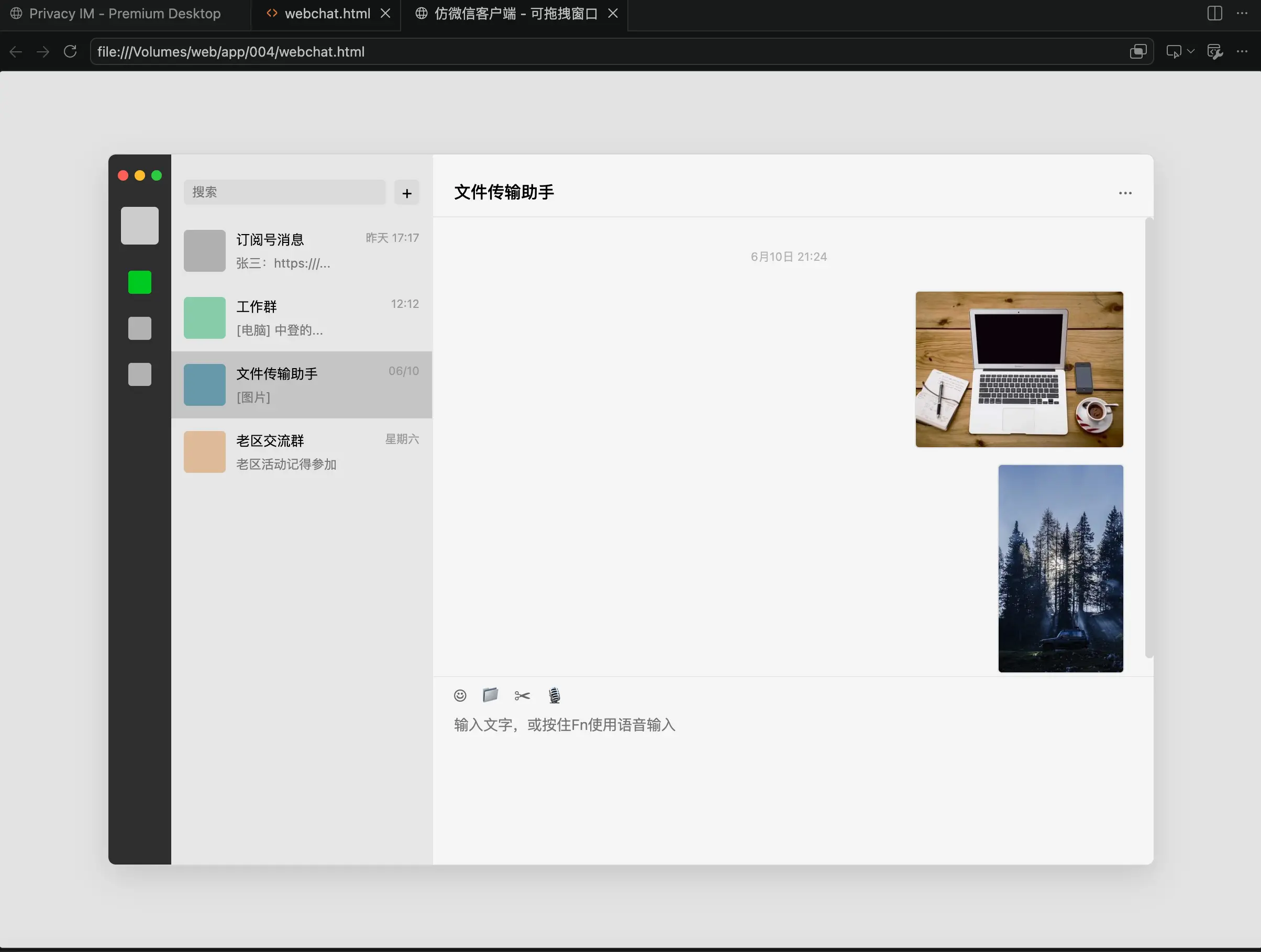
html代码:
<!DOCTYPE html>
<html lang="zh-CN">
<head>
    <meta charset="UTF-8">
    <meta name="viewport" content="width=device-width, initial-scale=1.0">
    <title>仿微信客户端 - 可拖拽窗口</title>
    <style>
        * {
            box-sizing: border-box;
            margin: 0;
            padding: 0;
            user-select: none; /* 防止拖拽时误选中文本 */
        }

        body {
            background: #e3e3e3;
            font-family: -apple-system, BlinkMacSystemFont, "Segoe UI", Roboto, Helvetica, Arial, sans-serif;
            height: 100vh;
            overflow: hidden;
            position: relative;
        }

        /* 微信主窗口:默认绝对居中 */
        .wechat-window {
            position: absolute;
            width: 1000px;
            height: 680px;
            background: #f5f5f5;
            border-radius: 8px;
            box-shadow: 0 10px 30px rgba(0,0,0,0.15);
            display: flex;
            overflow: hidden;
            border: 1px solid #d6d6d6;

            /* 配合 JS 初始化居中 */
            left: 50%;
            top: 50%;
            transform: translate(-50%, -50%);
        }

        /* ------------------ 1. 最左侧导航栏 ------------------ */
        .sidebar {
            width: 60px;
            background: #2e2e2e;
            display: flex;
            flex-direction: column;
            align-items: center;
            padding-top: 15px;
            position: relative;
        }

        /* Mac 风格红绿灯占位(作为拖拽手柄的一部分) */
        .window-controls {
            display: flex;
            gap: 6px;
            margin-bottom: 25px;
            cursor: move; /* 提示这里可以拖动 */
            width: 100%;
            justify-content: center;
        }
        .dot {
            width: 10px;
            height: 10px;
            border-radius: 50%;
        }
        .dot.red { background: #ff5f56; }
        .dot.yellow { background: #ffbd2e; }
        .dot.green { background: #27c93f; }

        .avatar {
            width: 36px;
            height: 36px;
            background: #ccc;
            border-radius: 4px;
            margin-bottom: 25px;
        }

        .menu-items {
            display: flex;
            flex-direction: column;
            gap: 22px;
            align-items: center;
            width: 100%;
        }
        .menu-icon {
            width: 22px;
            height: 22px;
            opacity: 0.6;
            cursor: pointer;
            transition: opacity 0.2s;
            background: #fff; /* 临时用白色方块代替图标,可自行换成 SVG 或图片 */
            border-radius: 3px;
        }
        .menu-icon.active, .menu-icon:hover {
            opacity: 1;
            background: #00ca20;
        }

        /* ------------------ 2. 中间聊天列表 ------------------ */
        .chat-list-panel {
            width: 250px;
            background: #e6e6e6;
            border-right: 1px solid #dc999900; /* 透明,靠背景色区分 */
            display: flex;
            flex-direction: column;
        }

        /* 顶部搜索框区域(也是拖拽热区) */
        .search-bar-container {
            height: 60px;
            padding: 22px 12px 10px 12px;
            display: flex;
            gap: 8px;
            align-items: center;
            cursor: move; /* 允许拖拽 */
        }
        .search-input {
            flex: 1;
            height: 24px;
            background: #dbdbdb;
            border: none;
            border-radius: 4px;
            padding: 0 8px;
            font-size: 12px;
            outline: none;
        }
        .add-btn {
            width: 24px;
            height: 24px;
            background: #dbdbdb;
            border-radius: 4px;
            display: flex;
            align-items: center;
            justify-content: center;
            font-size: 16px;
            cursor: pointer;
        }

        /* 列表滚动区 */
        .chat-items {
            flex: 1;
            overflow-y: auto;
        }
        .chat-item {
            display: flex;
            padding: 12px;
            gap: 10px;
            cursor: pointer;
            transition: background 0.1s;
        }
        .chat-item:hover {
            background: #dcdcdc;
        }
        .chat-item.active {
            background: #c5c5c5;
        }
        .item-avatar {
            width: 40px;
            height: 40px;
            background: #b0b0b0;
            border-radius: 4px;
            flex-shrink: 0;
        }
        .item-info {
            flex: 1;
            display: flex;
            flex-direction: column;
            justify-content: space-between;
            overflow: hidden;
        }
        .item-header {
            display: flex;
            justify-content: space-between;
            font-size: 13px;
            color: #000;
        }
        .item-time {
            font-size: 11px;
            color: #999;
        }
        .item-msg {
            font-size: 12px;
            color: #777;
            white-space: nowrap;
            overflow: hidden;
            text-overflow: ellipsis;
        }

        /* ------------------ 3. 右侧主聊天室 ------------------ */
        .main-chat-panel {
            flex: 1;
            background: #f5f5f5;
            display: flex;
            flex-direction: column;
            position: relative;
        }

        /* 聊天室顶部标题栏(重要的拖拽热区) */
        .chat-header {
            height: 60px;
            padding: 22px 20px 10px 20px;
            border-bottom: 1px solid #e5e5e5;
            font-size: 16px;
            font-weight: 500;
            cursor: move; /* 允许通过这里拖拽整个窗口 */
            display: flex;
            justify-content: space-between;
            align-items: center;
        }
        .more-btn {
            cursor: pointer;
            color: #666;
        }

        /* 消息展示区 */
        .chat-messages {
            flex: 1;
            padding: 20px;
            overflow-y: auto;
            display: flex;
            flex-direction: column;
            gap: 15px;
        }
        .msg-time {
            text-align: center;
            font-size: 11px;
            color: #b2b2b2;
            margin: 10px 0;
        }
        .msg-row {
            display: flex;
            gap: 10px;
        }
        .msg-row.reply {
            flex-direction: row-reverse;
        }
        .msg-content {
            max-width: 60%;
            background: #fff;
            padding: 8px 12px;
            border-radius: 4px;
            font-size: 14px;
            line-height: 1.4;
            word-break: break-all;
            box-shadow: 0 1px 2px rgba(0,0,0,0.05);
        }
        .msg-row.reply .msg-content {
            background: #95ec69;
        }
        .msg-img {
            max-width: 200px;
            max-height: 200px;
            border-radius: 4px;
            cursor: pointer;
            border: 1px solid #e0e0e0;
        }

        /* 底部输入框区 */
        .input-area {
            height: 180px;
            border-top: 1px solid #e5e5e5;
            display: flex;
            flex-direction: column;
            background: #f5f5f5;
        }
        .toolbar {
            height: 35px;
            padding: 0 20px;
            display: flex;
            align-items: center;
            gap: 15px;
        }
        .tool-icon {
            font-size: 16px;
            color: #666;
            cursor: pointer;
        }
        .text-input {
            flex: 1;
            border: none;
            background: transparent;
            padding: 0 20px;
            resize: none;
            outline: none;
            font-size: 14px;
            font-family: inherit;
            line-height: 1.5;
        }
        .input-hint {
            padding: 5px 20px 10px 20px;
            font-size: 12px;
            color: #b2b2b2;
            text-align: left;
            pointer-events: none;
        }

        /* 自定义滚动条样式,让它更像原生客户端 */
        ::-webkit-scrollbar {
            width: 8px;
        }
        ::-webkit-scrollbar-thumb {
            background: #cccc;
            border-radius: 4px;
        }
        ::-webkit-scrollbar-thumb:hover {
            background: #aaaa;
        }
    </style>
</head>
<body>

    <div class="wechat-window" id="wechatWindow">

        <div class="sidebar drag-handle">
            <div class="window-controls">
                <div class="dot red"></div>
                <div class="dot yellow"></div>
                <div class="dot green"></div>
            </div>
            <div class="avatar"></div>
            <div class="menu-items">
                <div class="menu-icon active"></div>
                <div class="menu-icon"></div>
                <div class="menu-icon"></div>
            </div>
        </div>

        <div class="chat-list-panel">
            <div class="search-bar-container drag-handle">
                <input type="text" class="search-input" placeholder="搜索">
                <div class="add-btn">+</div>
            </div>

            <div class="chat-items">
                <div class="chat-item">
                    <div class="item-avatar"></div>
                    <div class="item-info">
                        <div class="item-header"><span>订阅号消息</span><span class="item-time">昨天 17:17</span></div>
                        <div class="item-msg">张三:https:///...</div>
                    </div>
                </div>
                <div class="chat-item">
                    <div class="item-avatar" style="background:#8ca"></div>
                    <div class="item-info">
                        <div class="item-header"><span>工作群</span><span class="item-time">12:12</span></div>
                        <div class="item-msg">[电脑] 中登的...</div>
                    </div>
                </div>
                <div class="chat-item active">
                    <div class="item-avatar" style="background:#69a"></div>
                    <div class="item-info">
                        <div class="item-header"><span>文件传输助手</span><span class="item-time">06/10</span></div>
                        <div class="item-msg">[图片]</div>
                    </div>
                </div>
                <div class="chat-item">
                    <div class="item-avatar" style="background:#db9"></div>
                    <div class="item-info">
                        <div class="item-header"><span>老区交流群</span><span class="item-time">星期六</span></div>
                        <div class="item-msg">老区活动记得参加</div>
                    </div>
                </div>
            </div>
        </div>

        <div class="main-chat-panel">
            <div class="chat-header drag-handle" id="chatTitle">
                <span>文件传输助手</span>
                <span class="more-btn">···</span>
            </div>

            <div class="chat-messages">
                <div class="msg-time">6月10日 21:24</div>

                <div class="msg-row reply">
                    <img class="msg-img" src="https://picsum.photos/400/300" alt="发出的图片">
                </div>

                <div class="msg-row reply">
                    <img class="msg-img" src="https://picsum.photos/300/500" alt="发出的图片">
                </div>
            </div>

            <div class="input-area">
                <div class="toolbar">
                    <span class="tool-icon">☺</span>
                    <span class="tool-icon">📁</span>
                    <span class="tool-icon">✂</span>
                    <span class="tool-icon">🎙</span>
                </div>
                <textarea class="text-input" placeholder="输入文字,或按住Fn使用语音输入"></textarea>
                <div class="input-hint"></div>
            </div>
        </div>

    </div>

    <script>
        const win = document.getElementById('wechatWindow');
        // 绑定所有含有 drag-handle 类名的区域作为拖拽把手
        const handles = document.querySelectorAll('.drag-handle');

        let isDragging = false;
        let startX, startY;
        let initialLeft, initialTop;

        // 初始化窗口位置(因为用了 transform 居中,拖动前需要转化为绝对像素定位避免冲突)
        function initPosition() {
            const rect = win.getBoundingClientRect();
            win.style.transform = 'none'; // 移除居中 translate
            win.style.left = rect.left + 'px';
            win.style.top = rect.top + 'px';
        }

        handles.forEach(handle => {
            handle.addEventListener('mousedown', (e) => {
                // 如果点到了输入框、按钮等可交互组件,不触发拖拽
                if (e.target.tagName === 'INPUT' || e.target.classList.contains('add-btn') || e.target.classList.contains('more-btn')) {
                    return;
                }

                isDragging = true;

                // 首次拖拽时转换定位机制
                if (win.style.transform !== 'none') {
                    initPosition();
                }

                startX = e.clientX;
                startY = e.clientY;
                initialLeft = parseFloat(win.style.left);
                initialTop = parseFloat(win.style.top);

                document.addEventListener('mousemove', onMouseMove);
                document.addEventListener('mouseup', onMouseUp);
            });
        });

        function onMouseMove(e) {
            if (!isDragging) return;

            // 计算鼠标偏移量
            const dx = e.clientX - startX;
            const dy = e.clientY - startY;

            // 赋新值
            win.style.left = (initialLeft + dx) + 'px';
            win.style.top = (initialTop + dy) + 'px';
        }

        function onMouseUp() {
            isDragging = false;
            document.removeEventListener('mousemove', onMouseMove);
            document.removeEventListener('mouseup', onMouseUp);
        }

        // 阻止图片默认的拖拽行为,防止与窗口拖拽冲突
        document.querySelectorAll('img').forEach(img => {
            img.addEventListener('dragstart', (e) => e.preventDefault());
        });
    </script>
</body>
</html>
博客:www.ximi.me
给楼主投上 1 枚硬币
当前您的硬币余额:0