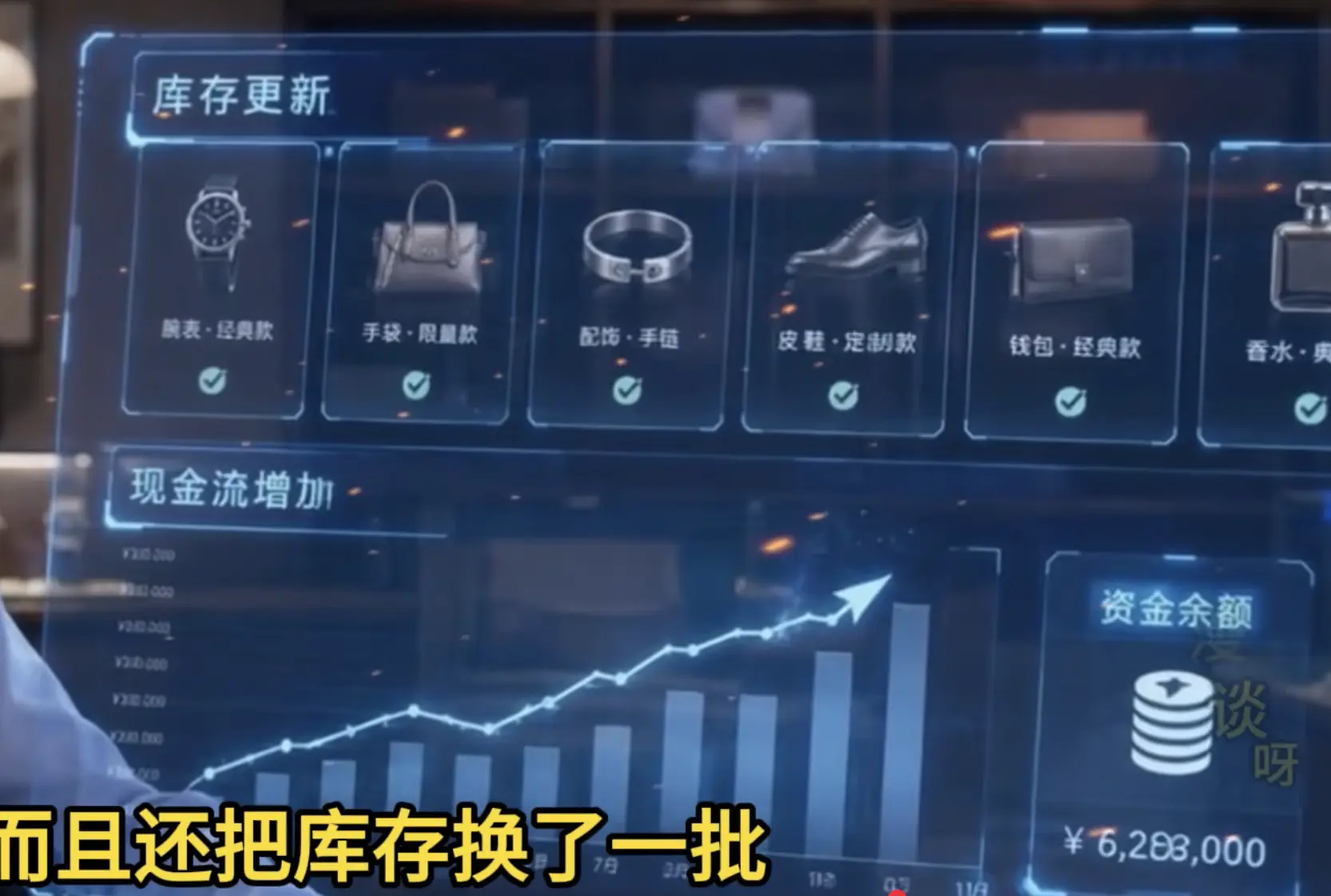
RT: 谁能写个类似的fui界面,各家模型尝试看看能完成不,看看能生成html页面不
ai不是有图就行吗
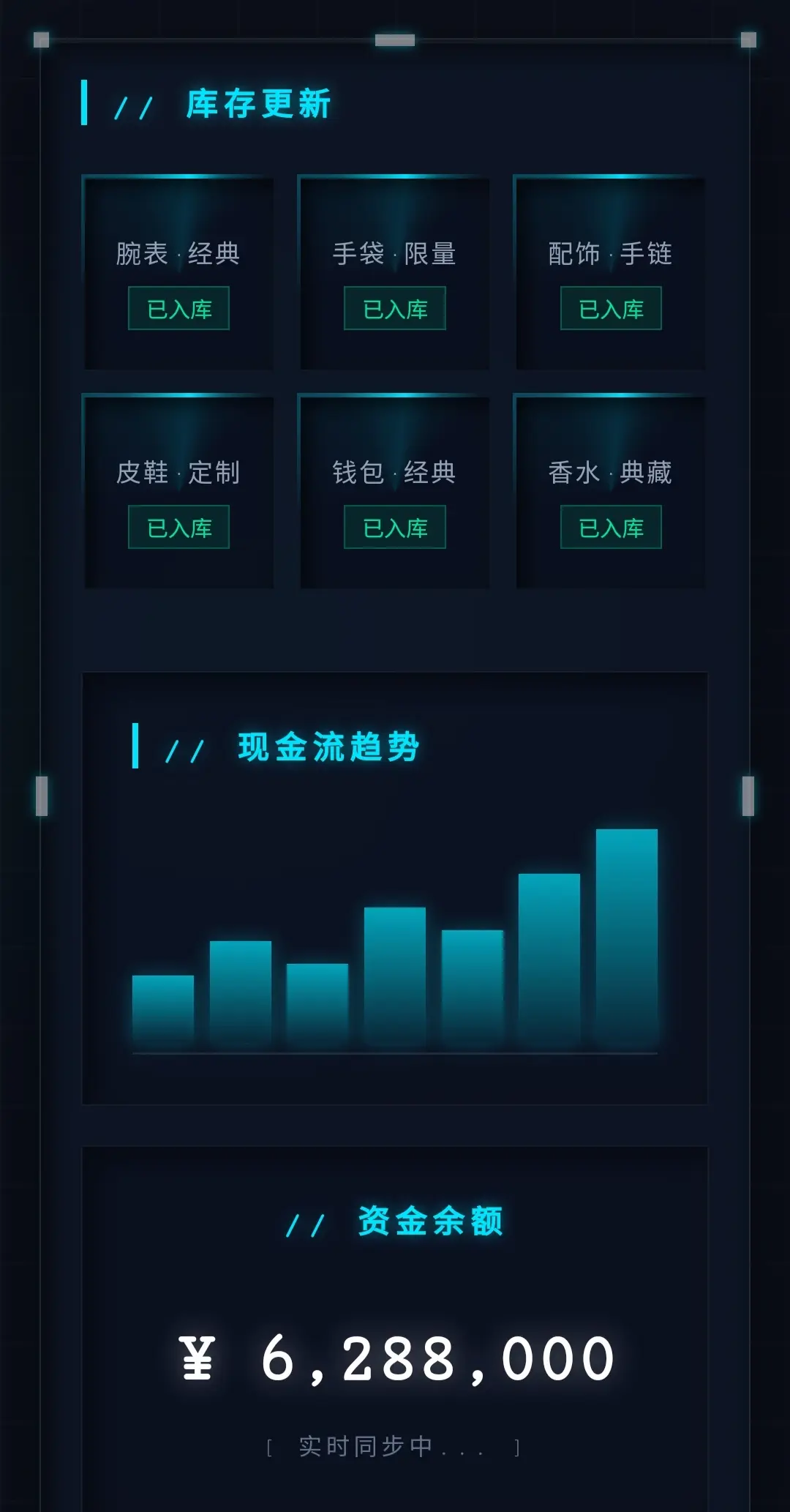
请接收,只能让AI弄到这样的。
<!DOCTYPE html>
<html lang="zh-CN">
<head>
    <meta charset="UTF-8">
    <meta name="viewport" content="width=device-width, initial-scale=1.0">
    <title>精密机械触点科技面板</title>
    <style>
        @property --border-angle {
            syntax: '<angle>';
            initial-value: 0deg;
            inherits: false;
        }

        :root {
            --neon-blue: #00e5ff;
            --dark-bg: #0b0f19;
            --panel-bg: rgba(15, 23, 42, 0.6);
        }

        * { box-sizing: border-box; margin: 0; padding: 0; }

        body {
            background-color: var(--dark-bg);
            background-image:
                radial-gradient(circle at 30% 40%, rgba(0, 229, 255, 0.05) 0%, transparent 50%),
                linear-gradient(rgba(255, 255, 255, 0.02) 1px, transparent 1px),
                linear-gradient(90deg, rgba(255, 255, 255, 0.02) 1px, transparent 1px);
            background-size: 100% 100%, 40px 40px, 40px 40px;
            font-family: 'Courier New', Courier, monospace;
            color: #e2e8f0;
            min-height: 100vh;
            display: flex;
            justify-content: center;
            align-items: center;
            padding: 20px;
        }

        /* 自然入场 */
        .fade-in-up {
            opacity: 0;
            transform: translateY(20px);
            animation: reveal 0.8s cubic-bezier(0.23, 1, 0.32, 1) forwards;
        }
        @keyframes reveal { to { opacity: 1; transform: translateY(0); } }

        /* 核心:直角凹陷主面板 */
        .dashboard {
            width: 100%;
            max-width: 1100px;
            background: var(--panel-bg);
            backdrop-filter: blur(16px);
            -webkit-backdrop-filter: blur(16px);
            padding: 40px;
            border-radius: 0;
            position: relative;
            box-shadow:
                0 20px 50px rgba(0, 0, 0, 0.6),
                inset 0 2px 0 rgba(255, 255, 255, 0.05),
                inset 0 -2px 0 rgba(0, 0, 0, 0.8),
                inset 4px 4px 15px rgba(0, 0, 0, 0.7),
                inset -4px -4px 15px rgba(20, 30, 50, 0.3);
            border: 1px solid rgba(255, 255, 255, 0.08);
            animation-delay: 0.1s;
        }

        /* --- 8个科技高亮触点 (通用样式) --- */
        .node {
            position: absolute;
            background: #ffffff;
            border-radius: 0; /* 绝对直角 */
            box-shadow: 0 0 8px var(--neon-blue), 0 0 15px var(--neon-blue);
            z-index: 10;
            animation: breathe 3s infinite alternate ease-in-out;
        }

        /* 1. 水平长方形 (上下边中点) - 宽20px, 高6px */
        .node-h {
            width: 20px;
            height: 6px;
        }
        .node-h.tc { top: -3px; left: 50%; transform: translateX(-50%); } /* 偏移量: 6/2 = 3px */
        .node-h.bc { bottom: -3px; left: 50%; transform: translateX(-50%); }

        /* 2. 垂直长方形 (左右边中点) - 宽6px, 高20px */
        .node-v {
            width: 6px;
            height: 20px;
        }
        .node-v.cl { top: 50%; left: -3px; transform: translateY(-50%); } /* 偏移量: 6/2 = 3px */
        .node-v.cr { top: 50%; right: -3px; transform: translateY(-50%); }

        /* 3. 正方形 (四个顶点) - 宽8px, 高8px */
        .node-sq {
            width: 8px;
            height: 8px;
        }
        .node-sq.tl { top: -4px; left: -4px; } /* 偏移量: 8/2 = 4px */
        .node-sq.tr { top: -4px; right: -4px; }
        .node-sq.bl { bottom: -4px; left: -4px; }
        .node-sq.br { bottom: -4px; right: -4px; }

        /* 呼吸灯动画 */
        @keyframes breathe {
            0% { opacity: 0.4; box-shadow: 0 0 5px var(--neon-blue); }
            100% { opacity: 1; box-shadow: 0 0 10px var(--neon-blue), 0 0 20px var(--neon-blue); }
        }

        h2 {
            font-size: 1rem;
            font-weight: bold;
            letter-spacing: 3px;
            text-transform: uppercase;
            color: var(--neon-blue);
            margin-bottom: 25px;
            text-shadow: 0 0 8px rgba(0, 229, 255, 0.5);
            border-left: 3px solid var(--neon-blue);
            padding-left: 12px;
        }

        .grid {
            display: grid;
            grid-template-columns: repeat(auto-fit, minmax(130px, 1fr));
            gap: 16px;
            margin-bottom: 40px;
        }

        /* 卡片流光 */
        .glow-card {
            position: relative;
            border-radius: 0;
            padding: 2px;
            background: conic-gradient(
                from var(--border-angle),
                transparent 60%,
                rgba(0, 229, 255, 0.3) 80%,
                var(--neon-blue) 90%,
                rgba(0, 229, 255, 0.3) 95%,
                transparent 100%
            );
            animation:
                reveal 0.8s cubic-bezier(0.23, 1, 0.32, 1) forwards,
                rotate-border 6s linear infinite;
            transition: all 0.3s ease;
        }

        .glow-card:hover { transform: translateY(-2px); box-shadow: 0 0 20px rgba(0, 229, 255, 0.2); }

        .card-content {
            background: rgba(8, 14, 28, 0.85);
            border-radius: 0;
            padding: 20px 10px;
            height: 100%;
            display: flex;
            flex-direction: column;
            align-items: center;
            justify-content: center;
            gap: 8px;
            text-align: center;
            box-shadow:
                inset 3px 3px 10px rgba(0, 0, 0, 0.8),
                inset -2px -2px 8px rgba(255, 255, 255, 0.02);
        }

        .icon { font-size: 1.8rem; filter: grayscale(0.2); }
        .name { font-size: 0.8rem; color: #94a3b8; letter-spacing: 1px; }
        .status {
            font-size: 0.7rem;
            color: #00e69c;
            background: rgba(0, 230, 156, 0.1);
            padding: 2px 8px;
            border: 1px solid rgba(0, 230, 156, 0.3);
        }

        .bottom-row { display: flex; gap: 20px; flex-wrap: wrap; }

        .panel {
            background: rgba(8, 14, 28, 0.6);
            border: 1px solid rgba(255, 255, 255, 0.05);
            border-radius: 0;
            padding: 25px;
            position: relative;
            box-shadow:
                inset 4px 4px 15px rgba(0, 0, 0, 0.6),
                inset -2px -2px 10px rgba(255, 255, 255, 0.02);
        }

        .chart-panel { flex: 2; min-width: 300px; }
        .balance-panel {
            flex: 1;
            min-width: 200px;
            display: flex;
            flex-direction: column;
            justify-content: center;
            align-items: center;
            text-align: center;
        }

        .bars {
            display: flex;
            align-items: flex-end;
            justify-content: space-between;
            height: 120px;
            gap: 8px;
            margin-top: 15px;
            border-bottom: 1px solid rgba(255,255,255,0.1);
            padding-bottom: 5px;
        }
        .bar {
            flex: 1;
            background: linear-gradient(to top, rgba(0, 229, 255, 0.1), rgba(0, 229, 255, 0.7));
            border-radius: 0;
            box-shadow: 0 0 10px rgba(0, 229, 255, 0.3);
            transition: height 1s ease;
        }

        .balance-amount {
            font-size: 2.2rem;
            font-weight: bold;
            letter-spacing: -1px;
            margin: 15px 0;
            color: #fff;
            text-shadow: 0 0 15px rgba(255, 255, 255, 0.4);
        }

        @keyframes rotate-border { to { --border-angle: 360deg; } }

        @media (max-width: 768px) {
            .dashboard { padding: 20px; }
            .bottom-row { flex-direction: column; }
            .grid { grid-template-columns: repeat(3, 1fr); gap: 10px; }
        }
    </style>
</head>
<body>

    <div class="dashboard fade-in-up">
        <!-- 8个科技高亮触点 -->
        <!-- 四个顶点:正方形 -->
        <div class="node node-sq tl"></div>
        <div class="node node-sq tr"></div>
        <div class="node node-sq bl"></div>
        <div class="node node-sq br"></div>

        <!-- 上下边中点:水平长方形 -->
        <div class="node node-h tc"></div>
        <div class="node node-h bc"></div>

        <!-- 左右边中点:垂直长方形 -->
        <div class="node node-v cl"></div>
        <div class="node node-v cr"></div>

        <h2>// 库存更新</h2>
        <div class="grid">
            <div class="glow-card" style="animation-delay: 0.1s, 0s">
                <div class="card-content"><div class="icon"></div><div class="name">腕表·经典</div><div class="status"> 已入库</div></div>
            </div>
            <div class="glow-card" style="animation-delay: 0.15s, 0s">
                <div class="card-content"><div class="icon"></div><div class="name">手袋·限量</div><div class="status"> 已入库</div></div>
            </div>
            <div class="glow-card" style="animation-delay: 0.2s, 0s">
                <div class="card-content"><div class="icon"></div><div class="name">配饰·手链</div><div class="status"> 已入库</div></div>
            </div>
            <div class="glow-card" style="animation-delay: 0.25s, 0s">
                <div class="card-content"><div class="icon"></div><div class="name">皮鞋·定制</div><div class="status"> 已入库</div></div>
            </div>
            <div class="glow-card" style="animation-delay: 0.3s, 0s">
                <div class="card-content"><div class="icon"></div><div class="name">钱包·经典</div><div class="status"> 已入库</div></div>
            </div>
            <div class="glow-card" style="animation-delay: 0.35s, 0s">
                <div class="card-content"><div class="icon"></div><div class="name">香水·典藏</div><div class="status"> 已入库</div></div>
            </div>
        </div>

        <div class="bottom-row">
            <div class="panel chart-panel fade-in-up" style="animation-delay: 0.4s">
                <h2>// 现金流趋势</h2>
                <div class="bars">
                    <div class="bar" style="height: 30%"></div>
                    <div class="bar" style="height: 45%"></div>
                    <div class="bar" style="height: 35%"></div>
                    <div class="bar" style="height: 60%"></div>
                    <div class="bar" style="height: 50%"></div>
                    <div class="bar" style="height: 75%"></div>
                    <div class="bar" style="height: 95%"></div>
                </div>
            </div>
            <div class="panel balance-panel fade-in-up" style="animation-delay: 0.5s">
                <h2 style="border:none; padding:0; text-align:center;">// 资金余额</h2>
                <div class="balance-amount">¥ 6,288,000</div>
                <div style="font-size: 0.75rem; color: #64748b; letter-spacing: 2px;">[ 实时同步中... ]</div>
            </div>
        </div>
    </div>

</body>
</html>
别的版本,我觉得没这个好看,就不发了。
域名狗 ai不是有图就行吗
容易自作聪明,所见非所得
妙笔生花 请接收,只能让AI弄到这样的。 [图片] 精密机械触点科技面板 @property --border-angle { syntax: ''; initial-value: 0deg; inherits ...
我也尝试了,好像都是类似 达不到图中效果,如昂渲染图还行,生成代码还差得远













 妙笔生花
妙笔生花